The paradigm is shifting from simple, reactive models to sophisticated, proactive agents capable of autonomous decision-making and multi-step reasoning. Building such agentic AI systems, especially for production workloads, demands a robust, fault-tolerant, and scalable architecture. This article delves into designing and orchestrating resilient agent workflows on Amazon Web Services (AWS), leveraging the power of Amazon Bedrock for foundation models and AWS EventBridge for event-driven orchestration. We will explore key aspects like agent reasoning loops, state management, long-context memory, and comprehensive recovery strategies.
The Dawn of Agentic AI
Traditional AI applications often operate in a request-response cycle, executing a single task based on immediate input. Agentic AI, in contrast, exhibits characteristics like:
- Autonomy: Ability to act without constant human intervention.
- Proactivity: Initiating actions based on goals rather than just reacting to stimuli.
- Social Ability: Interacting with other agents or systems.
- Adaptability: Learning and evolving over time.
These agents often involve complex, multi-step workflows, requiring sophisticated orchestration and robust error handling to ensure continuous operation and goal attainment.
Architecture Overview: Event-Driven Autonomous Agents on AWS
Our proposed architecture centers around an event-driven paradigm, providing decoupling, scalability, and resilience.
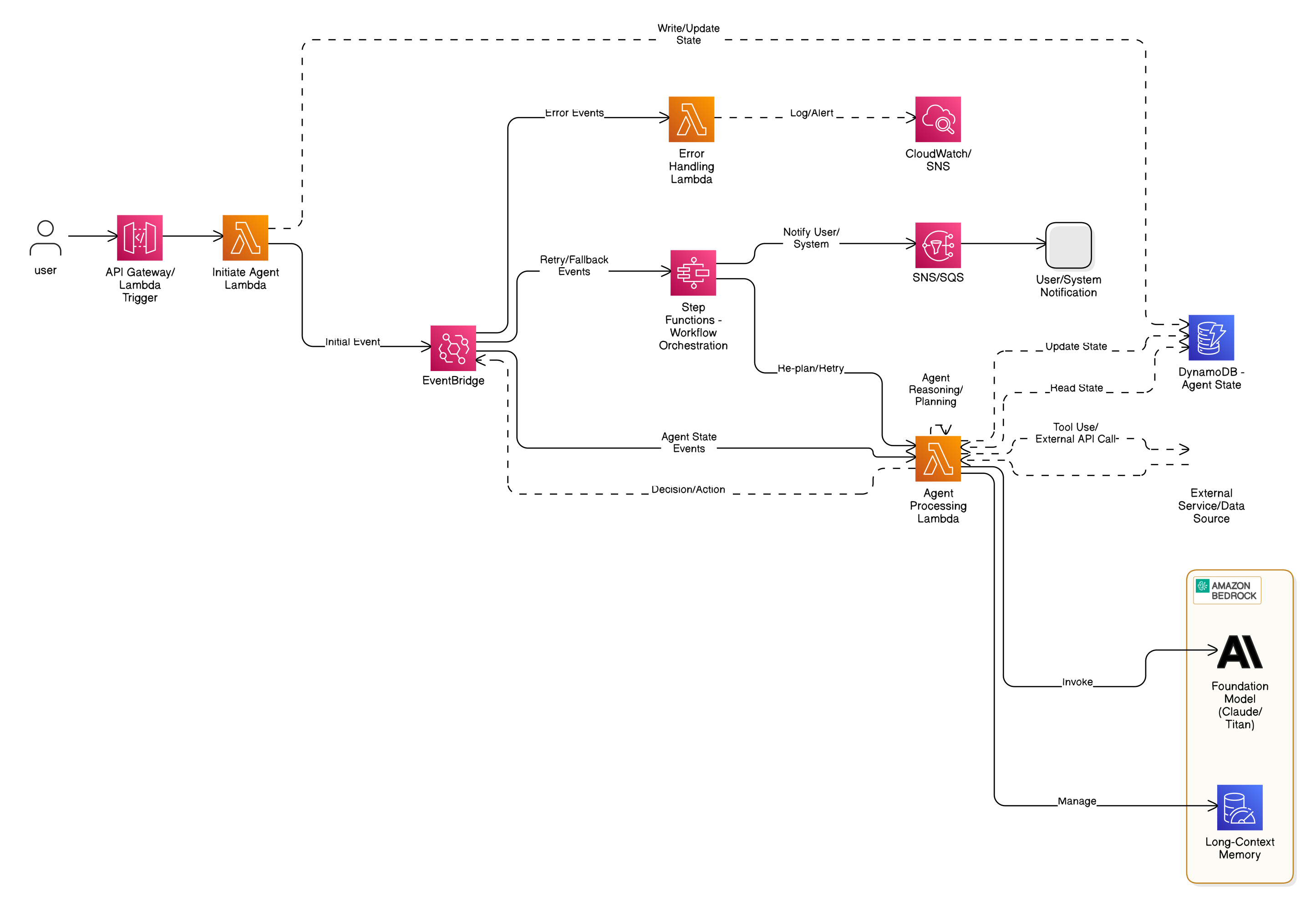
Figure 1: Full Architecture Diagram of an Event-Driven Autonomous Agent System on AWS
- API Gateway/Lambda Trigger: Entry point for initiating new agent workflows.
- Initiate Agent Lambda: Responsible for bootstrapping a new agent, creating its initial state in DynamoDB, and publishing an initial event to EventBridge.
- DynamoDB (Agent State): A highly available NoSQL database for storing and managing the agent’s current state, including its goals, context, tools, and conversation history.
- EventBridge: The central nervous system of the architecture. It acts as an event bus, routing agent state changes, task completion events, and error events to appropriate downstream consumers.
- Agent Processing Lambda: The core of the agent. This Lambda function consumes events from EventBridge, performs reasoning, planning, tool-use, and updates the agent’s state. It interacts with Amazon Bedrock for generative AI capabilities.
- Amazon Bedrock (Foundation Model & Long-Context Memory): Provides access to powerful foundation models like Claude or Titan for agent reasoning, natural language understanding, and generation. Its ability to handle long contexts is crucial for maintaining conversational memory and complex task execution.
- External Service/Data Source: Represents any external APIs or data sources the agent might interact with (e.g., CRM, inventory systems, knowledge bases).
- Step Functions (Workflow Orchestration): Used for orchestrating complex retry logic, fallback mechanisms, and re-planning workflows in case of errors or partial failures. It provides a visual workflow for complex state transitions.
- Error Handling Lambda: Catches and processes error events, logging them, sending alerts, and potentially triggering recovery mechanisms.
- SNS/SQS: For sending notifications to users or integrating with other systems.
- CloudWatch/SNS: For logging, monitoring, and alerting.
Agent Reasoning Loops: Reflection, Planning, and Tool-Use
The “brain” of our agent resides within the Agent Processing Lambda, powered by a sophisticated reasoning loop. This loop typically involves:
- Perception/Observation: Receiving the current agent state and any new events.
- Reflection: Analyzing the current state, progress towards the goal, and identifying any discrepancies or errors. This is where the foundation model excels, interpreting complex situations.
- Planning: Based on reflection, formulating a new plan or refining an existing one. This might involve breaking down a large task into smaller sub-tasks.
- Tool-Use: If the plan requires external actions, the agent identifies and invokes appropriate tools (e.g., calling an external API, querying a database).
- Execution: Performing the planned actions.
- Self-Correction/Re-planning: If an action fails or the outcome is not as expected, the agent re-enters the reflection phase to adjust its plan.
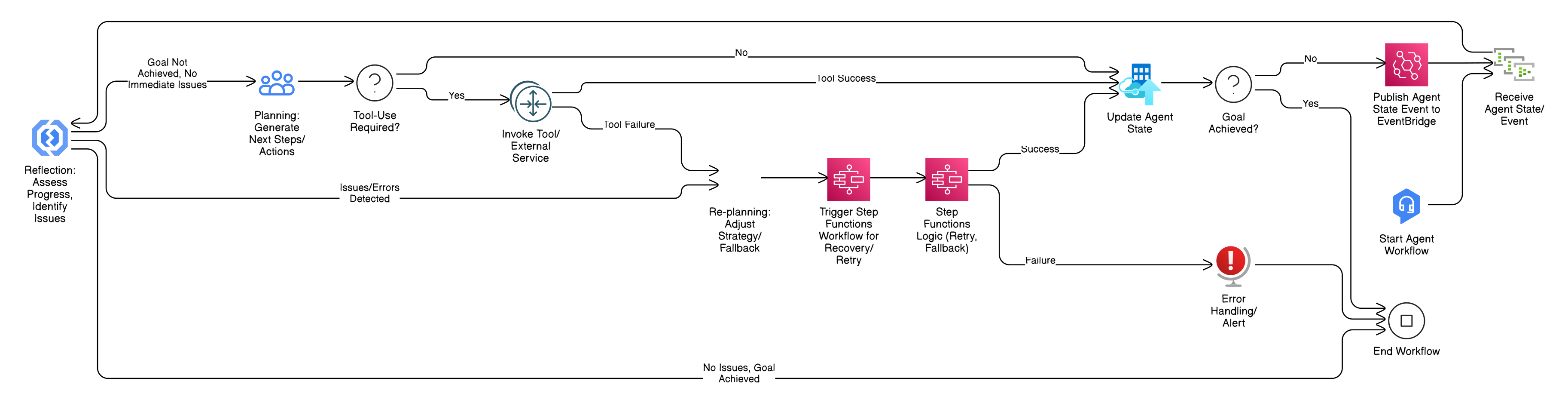
Figure 2: Flowchart of Planning and Re-planning with Triggered Workflows
Long-Context Memory with Bedrock-Hosted Claude or Titan
Maintaining a long-term understanding of the conversation history, past actions, and complex context is paramount for effective agentic behavior. Amazon Bedrock’s foundation models like Claude or Titan offer extended context windows, allowing the agent to “remember” more without explicit summarization or retrieval augmented generation (RAG) in every turn.
Benefits:
- Reduced Complexity: Less need for intricate RAG pipelines for basic conversational memory.
- Improved Cohesion: Agents can maintain a more natural and consistent interaction flow.
- Enhanced Reasoning: The model has direct access to a larger historical context, leading to more informed decisions.
For contexts exceeding even Bedrock’s generous limits, or for factual knowledge that needs to be external to the conversation, RAG with services like Amazon Kendra or OpenSearch remains a valuable pattern.
Agent State Management and Checkpointing in DynamoDB
DynamoDB is an ideal choice for managing agent state due to its high availability, scalability, and low latency. Each agent instance can have a dedicated item in a DynamoDB table, storing crucial information such as:
agentId: Unique identifier for the agent instance.status: Current status (e.g.,PLANNING,TOOL_EXECUTION,WAITING_FOR_INPUT,COMPLETED,FAILED).goal: The primary objective of the agent.context: A detailed JSON object containing the current context, including conversation history, perceived environment, and intermediate results.plan: The current execution plan (e.g., an array of steps).tools: Available tools and their specifications.metadata: Timestamps, last updated by, error counts, etc.
JSON Examples Showing Agent State Progression and Metadata Evolution:
Initial Agent State:
{
  "agentId": "agent-12345",
  "status": "INITIATED",
  "goal": "Book a flight from New York to San Francisco for tomorrow.",
  "context": {
    "conversationHistory": [
      {
        "role": "user",
        "content": "I need to book a flight."
      }
    ]
  },
  "plan": [],
  "tools": [
    {
      "name": "book_flight",
      "description": "Books a flight with specified origin, destination, and date."
    },
    {
      "name": "get_flight_info",
      "description": "Retrieves flight information based on criteria."
    }
  ],
  "metadata": {
    "createdAt": "2025-05-24T10:00:00Z",
    "lastUpdated": "2025-05-24T10:00:00Z",
    "invocationCount": 0,
    "errorCount": 0
  }
}
Agent State After Planning:
{
  "agentId": "agent-12345",
  "status": "PLANNING_COMPLETE",
  "goal": "Book a flight from New York to San Francisco for tomorrow.",
  "context": {
    "conversationHistory": [
      {
        "role": "user",
        "content": "I need to book a flight."
      },
      {
        "role": "assistant",
        "content": "Okay, I can help with that. Where would you like to fly from and to, and for what date?"
      },
      {
        "role": "user",
        "content": "New York to San Francisco, tomorrow."
      }
    ],
    "origin": "New York",
    "destination": "San Francisco",
    "date": "2025-05-25"
  },
  "plan": [
    {
      "step": 1,
      "action": "TOOL_USE",
      "toolName": "book_flight",
      "parameters": {
        "origin": "New York",
        "destination": "San Francisco",
        "date": "2025-05-25"
      },
      "status": "PENDING"
    }
  ],
  "tools": [
    {
      "name": "book_flight",
      "description": "Books a flight with specified origin, destination, and date."
    },
    {
      "name": "get_flight_info",
      "description": "Retrieves flight information based on criteria."
    }
  ],
  "metadata": {
    "createdAt": "2025-05-24T10:00:00Z",
    "lastUpdated": "2025-05-24T10:05:00Z",
    "invocationCount": 1,
    "errorCount": 0,
    "lastPlanGeneratedAt": "2025-05-24T10:04:30Z"
  }
}
Agent State After Tool Execution (Success):
{
  "agentId": "agent-12345",
  "status": "TOOL_EXECUTION_SUCCESS",
  "goal": "Book a flight from New York to San Francisco for tomorrow.",
  "context": {
    "conversationHistory": [
      {
        "role": "user",
        "content": "I need to book a flight."
      },
      {
        "role": "assistant",
        "content": "Okay, I can help with that. Where would you like to fly from and to, and for what date?"
      },
      {
        "role": "user",
        "content": "New York to San Francisco, tomorrow."
      },
      {
        "role": "tool_output",
        "content": {
          "booking_status": "success",
          "flight_id": "AA1234",
          "confirmation_number": "XYZ789"
        }
      }
    ],
    "origin": "New York",
    "destination": "San Francisco",
    "date": "2025-05-25",
    "bookingResult": {
      "booking_status": "success",
      "flight_id": "AA1234",
      "confirmation_number": "XYZ789"
    }
  },
  "plan": [
    {
      "step": 1,
      "action": "TOOL_USE",
      "toolName": "book_flight",
      "parameters": {
        "origin": "New York",
        "destination": "San Francisco",
        "date": "2025-05-25"
      },
      "status": "COMPLETED",
      "result": {
        "booking_status": "success",
        "flight_id": "AA1234",
        "confirmation_number": "XYZ789"
      }
    }
  ],
  "tools": [
    {
      "name": "book_flight",
      "description": "Books a flight with specified origin, destination, and date."
    },
    {
      "name": "get_flight_info",
      "description": "Retrieves flight information based on criteria."
    }
  ],
  "metadata": {
    "createdAt": "2025-05-24T10:00:00Z",
    "lastUpdated": "2025-05-24T10:10:00Z",
    "invocationCount": 2,
    "errorCount": 0,
    "lastPlanGeneratedAt": "2025-05-24T10:04:30Z",
    "lastToolExecutionAt": "2025-05-24T10:09:45Z"
  }
}
Checkpointing: Regularly updating the agent’s state in DynamoDB ensures that the agent can resume from its last known good state even if a Lambda invocation fails. This is a critical component of resilience.
Sample Lambda Function Code for Initiating and Updating Agent State
initiate_agent_lambda.py
import json
import os
import uuid
import boto3
from datetime import datetime

dynamodb = boto3.resource('dynamodb')
agents_table = dynamodb.Table(os.environ['AGENT_TABLE_NAME'])
eventbridge = boto3.client('events')

def lambda_handler(event, context):
    try:
        body = json.loads(event['body'])
        user_input = body.get('prompt')
        goal = body.get('goal', user_input) # Default goal to prompt if not specified

        if not user_input:
            return {
                'statusCode': 400,
                'body': json.dumps({'message': 'Missing "prompt" in request body'})
            }

        agent_id = str(uuid.uuid4())
        current_time = datetime.utcnow().isoformat() + "Z"

        initial_state = {
            'agentId': agent_id,
            'status': 'INITIATED',
            'goal': goal,
            'context': {
                'conversationHistory': [
                    {"role": "user", "content": user_input}
                ]
            },
            'plan': [],
            'tools': [], # Define tools here or fetch from a config service
            'metadata': {
                'createdAt': current_time,
                'lastUpdated': current_time,
                'invocationCount': 0,
                'errorCount': 0
            }
        }

        agents_table.put_item(Item=initial_state)

        # Publish an event to EventBridge to start the agent processing
        eventbridge.put_events(
            Entries=[
                {
                    'Source': 'com.agent.workflow',
                    'DetailType': 'AgentStateUpdated',
                    'Detail': json.dumps({
                        'agentId': agent_id,
                        'status': 'INITIATED',
                        'nextAction': 'PLANNING'
                    }),
                    'EventBusName': os.environ['EVENT_BUS_NAME']
                }
            ]
        )

        return {
            'statusCode': 200,
            'body': json.dumps({
                'message': 'Agent workflow initiated',
                'agentId': agent_id
            })
        }

    except Exception as e:
        print(f"Error initiating agent: {e}")
        return {
            'statusCode': 500,
            'body': json.dumps({'message': f'Error initiating agent: {str(e)}'})
        }
agent_processing_lambda.py (Simplified for illustration)
import json
import os
import boto3
from datetime import datetime

dynamodb = boto3.resource('dynamodb')
agents_table = dynamodb.Table(os.environ['AGENT_TABLE_NAME'])
eventbridge = boto3.client('events')
bedrock = boto3.client('bedrock-runtime') # For invoking Bedrock models

def get_bedrock_response(prompt, history, model_id="anthropic.claude-3-sonnet-20240229-v1:0"):
    """
    Invokes a Bedrock model for agent reasoning.
    This is a simplified example; real-world would involve more sophisticated prompt engineering
    and potentially tool definition parsing.
    """
    messages = []
    # Add history for long-context memory
    for msg in history:
        messages.append({"role": msg["role"], "content": msg["content"]})
    messages.append({"role": "user", "content": prompt})

    try:
        response = bedrock.invoke_model(
            modelId=model_id,
            contentType="application/json",
            accept="application/json",
            body=json.dumps({
                "anthropic_version": "bedrock-2023-05-31",
                "messages": messages,
                "max_tokens": 1000,
                "temperature": 0.7
            })
        )
        response_body = json.loads(response.get('body').read())
        return response_body['content'][0]['text']
    except Exception as e:
        print(f"Error invoking Bedrock: {e}")
        raise

def lambda_handler(event, context):
    try:
        detail = event['detail']
        agent_id = detail['agentId']
        current_status = detail['status']
        next_action = detail.get('nextAction')

        # 1. Fetch agent state
        response = agents_table.get_item(Key={'agentId': agent_id})
        agent_state = response.get('Item')

        if not agent_state:
            print(f"Agent {agent_id} not found.")
            return

        print(f"Processing agent {agent_id} with status {current_status}")

        updated_status = current_status
        new_event_detail = {
            'agentId': agent_id,
            'status': updated_status
        }

        # Simulate agent reasoning and state updates based on 'nextAction'
        if next_action == 'PLANNING' or current_status == 'INITIATED':
            prompt = f"Agent Goal: {agent_state['goal']}\nCurrent Context: {json.dumps(agent_state['context'])}\n" \
                     f"Tools available: {json.dumps(agent_state['tools'])}\n" \
                     f"What is the next step to achieve the goal? Think step-by-step and output in JSON format including 'action' (e.g., 'PLAN', 'TOOL_USE', 'COMPLETE') and 'details'."

            bedrock_response = get_bedrock_response(prompt, agent_state['context']['conversationHistory'])

            # Parse Bedrock's response to update plan and context
            # This is a simplified example; a real agent would parse the JSON for specific actions
            print(f"Bedrock Planning Response: {bedrock_response}")

            # Example: Assuming Bedrock returns a plan like: {"action": "TOOL_USE", "details": {"toolName": "book_flight", "parameters": {...}}}
            try:
                plan_output = json.loads(bedrock_response)
                if plan_output.get('action') == 'TOOL_USE':
                    agent_state['plan'].append({
                        "step": len(agent_state['plan']) + 1,
                        "action": "TOOL_USE",
                        "toolName": plan_output['details']['toolName'],
                        "parameters": plan_output['details']['parameters'],
                        "status": "PENDING"
                    })
                    updated_status = 'TOOL_EXECUTION_PENDING'
                    new_event_detail['nextAction'] = 'EXECUTE_TOOL'
                elif plan_output.get('action') == 'COMPLETE':
                    updated_status = 'COMPLETED'
                else:
                    updated_status = 'PLANNING_FAILED' # Or re-plan
                    new_event_detail['nextAction'] = 'REPLAN'

                agent_state['context']['conversationHistory'].append({"role": "assistant", "content": bedrock_response})

            except json.JSONDecodeError:
                print("Bedrock response was not valid JSON, re-planning or error.")
                updated_status = 'PLANNING_FAILED'
                new_event_detail['nextAction'] = 'REPLAN' # Trigger re-planning through EventBridge

        elif next_action == 'EXECUTE_TOOL':
            current_plan_step = next((step for step in agent_state['plan'] if step['status'] == 'PENDING'), None)
            if current_plan_step and current_plan_step['action'] == 'TOOL_USE':
                tool_name = current_plan_step['toolName']
                parameters = current_plan_step['parameters']

                print(f"Executing tool: {tool_name} with params: {parameters}")
                # Simulate tool invocation (replace with actual tool logic)
                tool_result = {"status": "success", "data": {"flight_id": "AA9876", "conf": "ABCDEF"}} # Mock success
                # tool_result = {"status": "failure", "error": "API Unavailable"} # Mock failure

                agent_state['context']['conversationHistory'].append({"role": "tool_output", "content": tool_result})

                if tool_result['status'] == 'success':
                    current_plan_step['status'] = 'COMPLETED'
                    current_plan_step['result'] = tool_result['data']
                    updated_status = 'TOOL_EXECUTION_SUCCESS'
                    new_event_detail['nextAction'] = 'PLANNING' # Re-evaluate after tool success
                else:
                    current_plan_step['status'] = 'FAILED'
                    current_plan_step['error'] = tool_result['error']
                    updated_status = 'TOOL_EXECUTION_FAILED'
                    new_event_detail['nextAction'] = 'REPLAN' # Trigger re-planning on failure

        # Update metadata
        agent_state['status'] = updated_status
        agent_state['metadata']['lastUpdated'] = datetime.utcnow().isoformat() + "Z"
        agent_state['metadata']['invocationCount'] += 1

        # Checkpoint the agent state
        agents_table.put_item(Item=agent_state)

        # Publish updated state event
        eventbridge.put_events(
            Entries=[
                {
                    'Source': 'com.agent.workflow',
                    'DetailType': 'AgentStateUpdated',
                    'Detail': json.dumps(new_event_detail),
                    'EventBusName': os.environ['EVENT_BUS_NAME']
                }
            ]
        )

    except Exception as e:
        print(f"Critical error in agent processing for {agent_id}: {e}")
        # Publish an error event to trigger Step Functions for recovery
        eventbridge.put_events(
            Entries=[
                {
                    'Source': 'com.agent.workflow',
                    'DetailType': 'AgentError',
                    'Detail': json.dumps({
                        'agentId': agent_id,
                        'errorMessage': str(e),
                        'currentState': agent_state # Include relevant state for debugging
                    }),
                    'EventBusName': os.environ['EVENT_BUS_NAME']
                }
            ]
        )
        raise # Re-raise to ensure Lambda reports a failure
Recovery Strategies When Errors or Misalignment Occur
Resilience is paramount. Errors can arise from various sources:
- Foundation Model Misunderstanding: The LLM misinterprets the goal or generates an incorrect plan.
- Tool Execution Failures: External APIs are unavailable, return errors, or have unexpected responses.
- State Corruption: Unlikely with DynamoDB, but potential for logical inconsistencies.
- External System Changes: Required information or services change.
Our architecture leverages Step Functions for robust recovery:
1. Event-Driven Error Capture: When agent_processing_lambda encounters a critical error or determines a “REPLAN” is necessary due to misaligned output or failed tool execution, it publishes an AgentError event to EventBridge.
2. Step Functions as the Orchestrator: An EventBridge rule triggers a Step Functions state machine upon receiving an AgentError event.
3. Fallback and Retry Logic:
- Retries: For transient errors (e.g., network issues, API rate limits), the state machine can be configured to automatically retry the failed step or the entire
AgentProcessingLambdainvocation after a delay. - Compensating Actions: If retries fail, Step Functions can trigger compensating actions. For example, if a flight booking fails, it could:
- Notify the user about the failure and ask for alternative dates.
- Try an alternative booking tool.
- Rollback any partial changes.
- Human Intervention: For unrecoverable errors or critical misalignments, Step Functions can notify a human operator (e.g., via SNS, PagerDuty, or a custom UI) for manual intervention.
- Re-planning: After a failure, the Step Functions workflow can invoke the
AgentProcessingLambdaagain, explicitly setting anextActionto ‘REPLAN’. This signals the agent to re-evaluate its state and generate a new plan.
Step Functions YAML for Orchestrating Fallback and Retry Logic:
AWSTemplateFormatVersion: '2010-09-09'
Transform: AWS::Serverless-2016-10-31
Description: Step Functions State Machine for Agent Workflow Recovery

Resources:
  AgentRecoveryStateMachine:
    Type: AWS::Serverless::StateMachine
    Properties:
      Definition:
        Comment: State machine for recovering agent workflows
        StartAt: CheckAgentErrorType
        States:
          CheckAgentErrorType:
            Type: Choice
            Choices:
              - Variable: $.detail.errorMessage
                StringContains: "Tool Execution Failed"
                Next: HandleToolExecutionFailure
              - Variable: $.detail.errorMessage
                StringContains: "Planning Failed"
                Next: HandlePlanningFailure
            Default: NotifyHumanOperator # Catch-all for unexpected errors

          HandleToolExecutionFailure:
            Type: Task
            Resource: arn:aws:states:::lambda:invoke
            Parameters:
              FunctionName: !GetAtt AgentProcessingLambda.Arn
              Payload:
                detail:
                  agentId.$: "$.detail.agentId"
                  status: "TOOL_EXECUTION_FAILED" # Set status for re-processing
                  nextAction: "REPLAN" # Instruct agent to re-plan
            Retry:
              - ErrorEquals: ["Lambda.ServiceException", "Lambda.AWSLambdaException", "Lambda.SdkClientException"]
                IntervalSeconds: 2
                MaxAttempts: 3
                BackoffRate: 2
            Catch:
              - ErrorEquals: ["States.ALL"]
                Next: NotifyHumanOperator
            End: true

          HandlePlanningFailure:
            Type: Task
            Resource: arn:aws:states:::lambda:invoke
            Parameters:
              FunctionName: !GetAtt AgentProcessingLambda.Arn
              Payload:
                detail:
                  agentId.$: "$.detail.agentId"
                  status: "PLANNING_FAILED"
                  nextAction: "REPLAN"
            Retry:
              - ErrorEquals: ["Lambda.ServiceException", "Lambda.AWSLambdaException", "Lambda.SdkClientException"]
                IntervalSeconds: 2
                MaxAttempts: 3
                BackoffRate: 2
            Catch:
              - ErrorEquals: ["States.ALL"]
                Next: NotifyHumanOperator
            End: true

          NotifyHumanOperator:
            Type: Task
            Resource: arn:aws:states:::sns:publish
            Parameters:
              TopicArn: !Ref HumanInterventionSNSTopic
              Message:
                Subject: "Critical Agent Workflow Error: $.detail.agentId"
                Message: "An agent workflow encountered a critical error: $.detail.errorMessage. Review logs and intervene. Agent State: $.detail.currentState"
            End: true

      Policies:
        - Statement:
            - Effect: Allow
              Action:
                - lambda:InvokeFunction
              Resource: !GetAtt AgentProcessingLambda.Arn
            - Effect: Allow
              Action:
                - sns:Publish
              Resource: !Ref HumanInterventionSNSTopic

  # Lambda function (assuming it's defined elsewhere in the SAM template)
  AgentProcessingLambda:
    Type: AWS::Serverless::Function
    Properties:
      FunctionName: AgentProcessingLambda
      Handler: agent_processing_lambda.lambda_handler
      Runtime: python3.10
      MemorySize: 2048 # Adjust based on Bedrock usage
      Timeout: 300 # Adjust based on expected processing time
      Environment:
        Variables:
          AGENT_TABLE_NAME: !Ref AgentTable
          EVENT_BUS_NAME: !Ref AgentEventBus
      Policies:
        - DynamoDBWritePolicy:
            TableName: !Ref AgentTable
        - EventBridgePutEventsPolicy:
            EventBusName: !Ref AgentEventBus
        - Statement: # Policy for Bedrock invoke_model
            - Effect: Allow
              Action:
                - bedrock:InvokeModel
              Resource: "*" # Restrict to specific models if possible

  # DynamoDB Table
  AgentTable:
    Type: AWS::DynamoDB::Table
    Properties:
      TableName: AgentWorkflows
      AttributeDefinitions:
        - AttributeName: agentId
          AttributeType: S
      KeySchema:
        - AttributeName: agentId
          KeyType: HASH
      BillingMode: PAY_PER_REQUEST

  # EventBridge Custom Bus
  AgentEventBus:
    Type: AWS::Events::EventBus
    Properties:
      Name: AgentWorkflowBus

  # EventBridge Rule to trigger AgentProcessingLambda
  AgentStateUpdateRule:
    Type: AWS::Events::Rule
    Properties:
      EventBusName: !Ref AgentEventBus
      EventPattern:
        source:
          - com.agent.workflow
        detail-type:
          - AgentStateUpdated
      Targets:
        - Arn: !GetAtt AgentProcessingLambda.Arn
          Id: AgentProcessingLambdaTarget

  # EventBridge Rule to trigger AgentRecoveryStateMachine
  AgentErrorRule:
    Type: AWS::Events::Rule
    Properties:
      EventBusName: !Ref AgentEventBus
      EventPattern:
        source:
          - com.agent.workflow
        detail-type:
          - AgentError
      Targets:
        - Arn: !GetAtt AgentRecoveryStateMachine.Arn
          Id: AgentRecoveryStateMachineTarget
          RoleArn: !GetAtt EventBridgeInvokeSFNRole.Arn # Role for EventBridge to invoke Step Functions

  EventBridgeInvokeSFNRole:
    Type: AWS::IAM::Role
    Properties:
      AssumeRolePolicyDocument:
        Version: '2012-10-17'
        Statement:
          - Effect: Allow
            Principal:
              Service:
                - events.amazonaws.com
            Action:
              - sts:AssumeRole
      Policies:
        - PolicyName: InvokeSFNPolicy
          PolicyDocument:
            Version: '2012-10-17'
            Statement:
              - Effect: Allow
                Action:
                  - states:StartExecution
                Resource: !GetAtt AgentRecoveryStateMachine.Arn

  HumanInterventionSNSTopic:
    Type: AWS::SNS::Topic
    Properties:
      TopicName: AgentWorkflowHumanInterventionAlerts
Real-time vs. Batch Tradeoffs: Compute, Latency, and Cost
The design presented emphasizes real-time, event-driven agentic workflows. However, it’s crucial to consider the tradeoffs:
- Real-time (Current Approach):
- Compute: High concurrency of Lambda invocations, potentially leading to bursts and cold starts.
- Latency: Generally low, as processing starts immediately upon event arrival. Each agent “turn” (reflection, planning, tool-use) is typically executed within seconds.
- Cost: Pay-per-execution model for Lambda and DynamoDB, can be cost-effective for intermittent workloads but scale up with high request rates. Bedrock costs are per token/inference.
- Best for: Interactive agents, customer service bots, dynamic automation tasks requiring immediate responses.
- Batch Processing:
- Compute: Can leverage larger EC2 instances, AWS Batch, or EMR for processing large volumes of agent tasks. More predictable resource allocation.
- Latency: Higher, as tasks are queued and processed in batches. Not suitable for interactive scenarios.
- Cost: Potentially lower compute cost for large, sustained workloads due to optimized resource utilization.
- Best for: Data analysis, long-running simulations, background automation where immediate results aren’t critical.
For many agentic AI workflows, a hybrid approach might be optimal. Real-time processing for initial interactions and critical path decisions, with batch processing for long-running, non-urgent sub-tasks or post-processing. Our architecture could integrate batch components by having agents publish events that trigger Batch jobs or Data Pipeline workflows.
Conclusion
Building resilient agentic AI workflows on AWS is a complex but rewarding endeavor. By embracing an event-driven architecture with EventBridge, leveraging Amazon Bedrock for powerful foundation models and long-context memory, managing state meticulously in DynamoDB, and orchestrating recovery strategies with Step Functions, developers can create autonomous AI systems that are not only intelligent but also robust, scalable, and fault-tolerant. This approach paves the way for sophisticated automation and enhanced user experiences, pushing the boundaries of what AI can achieve in real-world production environments.