

A Practical Guide to AWS Cloud Migration and Modernization for MENA Enterprises
Every enterprise migration conversation I have starts the same way. Someone in the room says, “We want to move to the cloud.” What they usually mean is: we want to move our workloads off ageing on-premises infrastructure, reduce our data center footprint, and stop worrying about hardware refresh cycles.
That is migration. It is a valid goal. But it is also just the first chapter. For MENA enterprises, AWS cloud migration provides the foundation to reduce data centre costs, modernize legacy workloads, and meet regional compliance requirements like UAE PDPL and SAMA CSF.
The enterprises that actually realize the value of cloud are the ones that use migration as the trigger for something bigger: modernizing how their applications are built, deployed, and operated. Organizations that migrate without a modernization strategy often end up with higher costs, slower delivery, and the same technical constraints, just running on someone else’s hardware in a different location.
In this guide, I want to walk through the full Migration and Modernization journey on AWS. Not a marketing overview, but the practitioner’s version: what the tools actually do, where the hard problems are, what the latest AI-powered capabilities change, and how MENA enterprises specifically need to think about this.
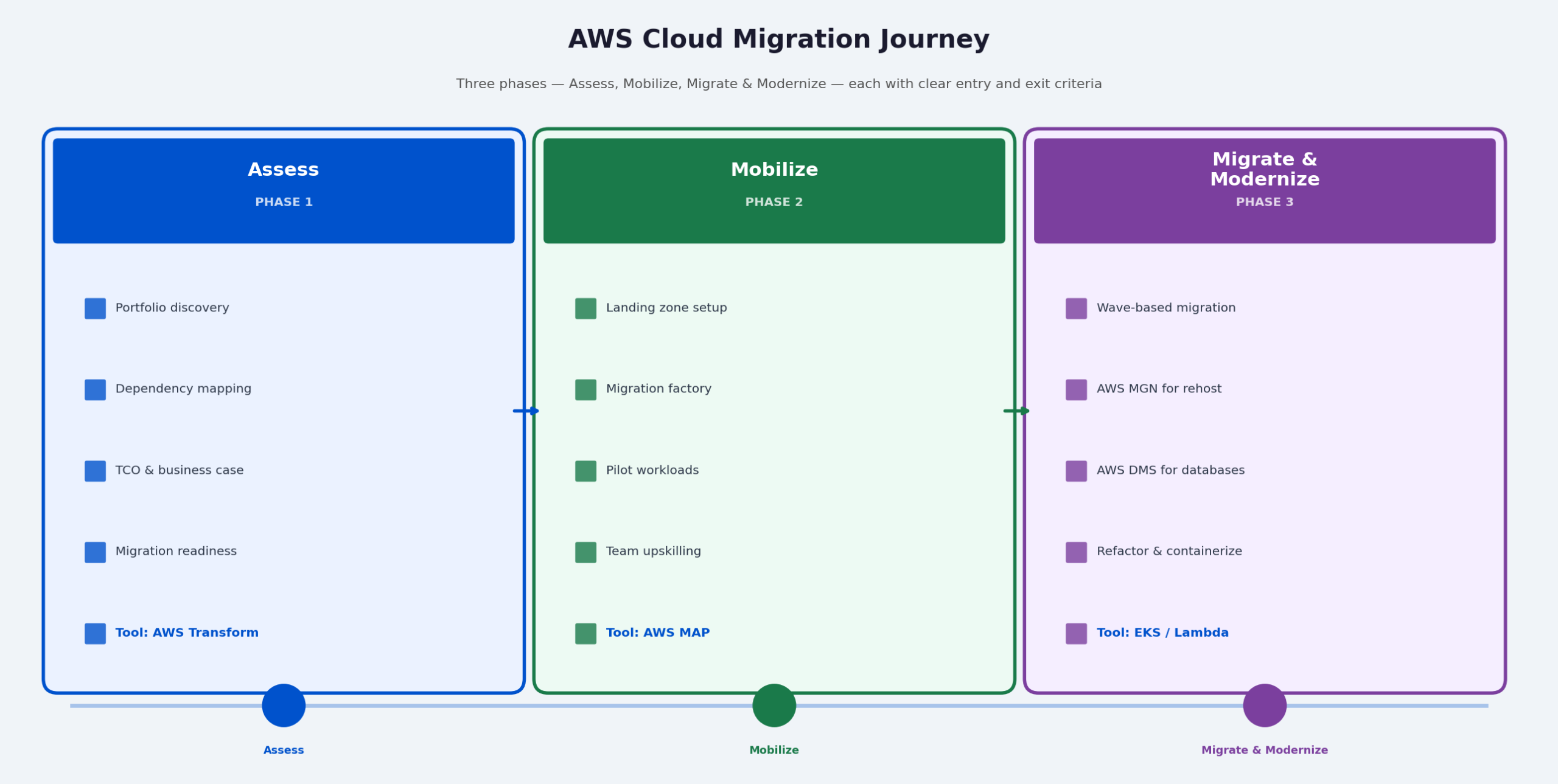
Figure 1: AWS Cloud Migration. The three-phase journey from assess through mobilize to migrate and modernize. Phase 1 is not a formality. It is where most migration programs succeed or fail.
AWS Migration Assessment and Strategy: Before You Move Anything
The most common mistake in migration programs is starting execution too early. Teams want to move fast, so they pick a handful of workloads and start migrating before they fully understand their portfolio. Six months later, they have completed the easy workloads and are facing the complex ones with no map, no wave plan, and a growing list of undocumented dependencies.
A proper assessment is not overhead. It is the single highest-return investment you make before the first workload moves.
AWS Transform: The Central Platform
AWS Transform, which replaced AWS Migration Hub in late 2025, is where every serious migration program should start. It is the central platform for migration and modernization planning, and it has evolved significantly beyond its predecessor.
- Portfolio discovery and dependency mapping: Automated discovery of your application portfolio across on-premises and cloud environments. AWS Transform maps dependencies between applications so you understand what breaks if you move workload A before workload B.
- Migration readiness scoring: Each workload receives a readiness score based on complexity, dependencies, and risk factors. This determines your wave sequence before you touch a single server.
- 7Rs strategy recommendation: For each workload, AWS Transform recommends the right migration strategy based on its analysis. Not every workload should be migrated the same way.
- Business case generation: TCO analysis and business case built per migration wave. This is what your CFO actually needs before approving the program budget.
- Wave planning and program management: End-to-end migration tracking across workloads, teams, and timelines in a single platform.
The 7Rs Framework: Asking the Right Question Per Workload
The 7Rs framework gives you a decision structure for each application in your portfolio. Applying the same strategy to every workload is where migration programs get into trouble.
| Strategy | Best For | Primary AWS Tool |
| Rehost (Lift and Shift) | Fast data center exit, tight timelines | AWS MGN |
| Replatform | DB and middleware optimization without full redesign | AWS DMS, Amazon RDS |
| Refactor | Cloud-native value, scalability, deployment velocity | EKS, Lambda, ECS |
| Repurchase | Replace legacy on-premises SaaS with modern alternatives | AWS Marketplace |
| Retire | Decommission unused or redundant applications | Portfolio review |
| Retain | Compliance constraints or not yet ready to migrate | AWS Outposts (hybrid) |
| Relocate | Large VMware estates moving to AWS unchanged | VMware Cloud on AWS |
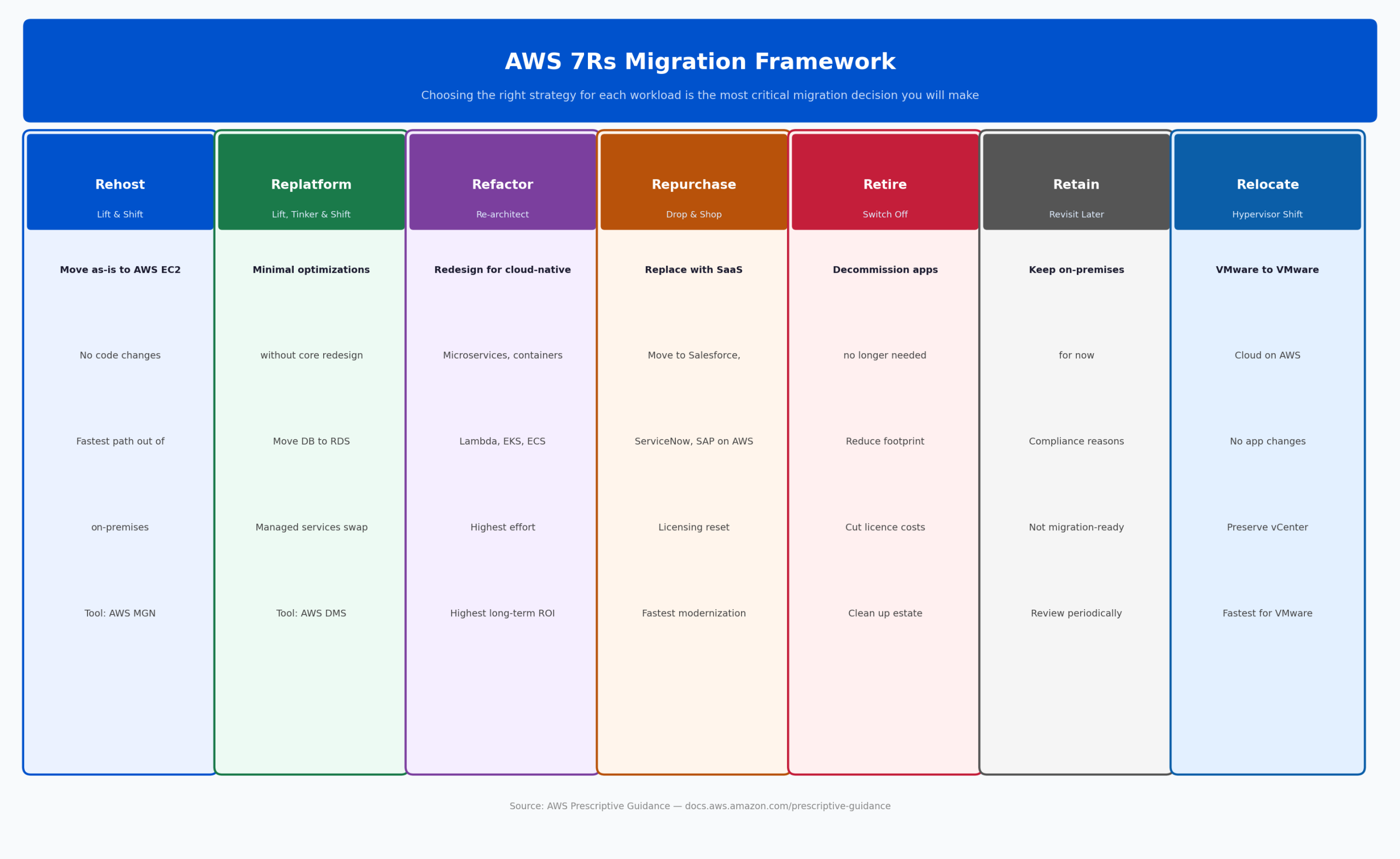
Figure 2: AWS 7Rs Migration Framework. Most enterprise migration programs apply multiple strategies across the portfolio. The discipline is asking the right question for each workload before moving it.
Core Migration Execution: AWS MGN and DMS
AWS Application Migration Service (MGN)
MGN is the primary tool for infrastructure migration. It uses agent-based continuous block-level replication: it copies your source servers into AWS in real time with minimal performance impact on running workloads. Before you cut over, you can test your migrated workloads in AWS while your source servers remain live. The actual cutover window is typically under an hour.
MGN works across physical servers, VMware, Hyper-V, and other cloud environments. It handles Windows, Linux, and most enterprise operating systems. For enterprise migrations running a lift-and-shift strategy, this is where execution starts.
AWS Database Migration Service (DMS)
Databases are the hardest part of almost every migration program. They carry the most risk, have the lowest tolerance for downtime, and frequently run on versions and configurations that require careful handling.
AWS DMS handles both homogeneous migrations (Oracle to Oracle, SQL Server to SQL Server) and heterogeneous migrations (Oracle to Aurora PostgreSQL, SQL Server to MySQL). It maintains continuous replication during migration, meaning your source database stays fully live until the moment of cutover. DMS Serverless, now generally available, removes the need to provision and manage replication instances. It scales replication capacity automatically based on workload volume.
For heterogeneous migrations, AWS Schema Conversion Tool (SCT) automates schema conversion and clearly identifies what converts automatically versus what requires manual attention. This is where you understand your true migration effort for database workloads before you commit to a timeline.
VMware Migrations: The Relocate Path
For enterprises running large VMware estates, VMware Cloud on AWS allows you to move VMware workloads to AWS without changing the hypervisor, the operations model, or the management tooling. Your VMware administrators continue working with familiar tools. Your applications see no change.
This is the fastest path out of on-premises VMware with the lowest operational disruption. It buys you time to then modernize individual workloads at a pace that works for your team, rather than forcing a big-bang migration.
Mainframe Modernization
Mainframe modernization is its own discipline, and AWS Transform has invested significantly in making it tractable. The challenge is that mainframe codebases, particularly COBOL applications, often contain decades of accumulated business logic that no living engineer fully understands. A direct rewrite approach almost always fails.
AWS Transform approaches mainframe modernization in six stages: code analysis, document generation, code decomposition, migration planning, code refactor (including automated COBOL to Java conversion), and deployment with Infrastructure as Code. The AI-powered analysis phase produces documentation of what the system actually does before anyone attempts to change it.
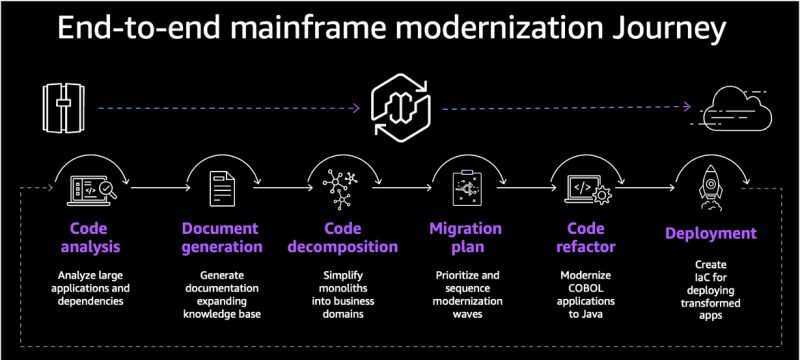
Figure 3: End-to-end mainframe modernization journey on AWS. AWS Transform handles code analysis and document generation before any refactoring begins, ensuring the business logic is understood before it is changed.
AWS Cloud Modernization: What Comes After Migration
Migration moves your workloads to AWS. Modernization changes how they work. The enterprises that unlock real cloud economics are the ones that do both. A workload running on a single EC2 instance, the same way it ran on-premises, has not gained elastic scaling, deployment velocity, or managed service economics. It has gained a monthly AWS bill.
Containerization: Amazon EKS and ECS
Containerization is the most common first modernization step for application workloads. Moving from virtual machines to containers gives you faster deployment cycles, significantly better resource utilization, and the ability to scale individual application components rather than entire servers.
Amazon EKS (Elastic Kubernetes Service) is the managed Kubernetes option. It handles the control plane, provides native AWS integrations for networking, security, and storage, and supports both EC2 worker nodes and AWS Fargate for serverless container execution. Fargate removes the need to manage underlying compute entirely: you define what you want to run, and AWS runs it.
Amazon ECS (Elastic Container Service) is the AWS-native container orchestration alternative. It has a simpler operational model and integrates tightly with the rest of the AWS ecosystem. For teams not already invested in Kubernetes, ECS is often the faster path to production.
Serverless: AWS Lambda and Event-Driven Architecture
With AWS Lambda, you write functions that execute in response to events. You pay only for the compute time your code actually uses. There is no infrastructure to manage, no capacity to provision, and no patching cycle.
The right workloads for Lambda are event-driven, stateless processes with variable load: API backends, data processing pipelines, automation and orchestration logic, and scheduled jobs. The practical approach for most enterprise applications is incremental decomposition: identify the components that fit an event-driven model and start there, rather than attempting a full monolith-to-serverless conversion in one step.
Database Modernization
The highest-impact database modernization move for most enterprises is migrating from commercial databases (Oracle, SQL Server) to AWS-managed open-source alternatives. Amazon Aurora gives you up to five times the throughput of standard PostgreSQL and three times MySQL performance, with multi-AZ replication, automated backups, and managed patching. Eliminating Oracle licensing alone delivers significant cost reduction.
For organizations not ready for a full engine change, Amazon RDS provides managed patching, automated backups, multi-AZ, and read replicas without any application changes. It is the Replatform strategy for databases and the right first step for many teams.
Agentic AI in AWS Cloud Migration and Modernization
The tooling landscape for migration and modernization has changed significantly in 2025 and 2026. AI agents are now handling phases of the migration lifecycle that previously required senior architects and months of manual effort. This is not an incremental improvement. It is a different way of running these programs.
–> AWS Transform AI Agents: ARA and MODA
Beyond portfolio assessment, AWS Transform now includes AI agents for two high-value phases of modernization:
- Agentic Readiness Analysis (ARA): Evaluates whether your existing systems are safe to be called by AI agents. It examines APIs, identity and access patterns, state management, human-in-the-loop controls, and observability coverage. If you are planning to build AI-powered applications on your modernized infrastructure (and per Gartner, 40% of enterprise applications will incorporate AI agents by the end of 2026), ARA tells you exactly what needs to be addressed before those systems are exposed to an agent.
- Modernization Analysis (MODA): Scans your codebase for cloud-native maturity gaps and maps every finding to a specific AWS modernization pathway. It identifies containerization candidates, serverless opportunities, and hidden dependencies that would complicate migration. It produces in hours what a senior architect would take weeks to produce manually, with more consistency.
–> Kiro: Spec-Driven Agentic Development
Kiro is Amazon’s agentic IDE, launched in 2026 as the evolution of Amazon Q Developer. It is built on Code OSS (the open-source base of VS Code) and introduces a structural requirement that most AI coding tools skip: it will not generate code until a formal specification exists.
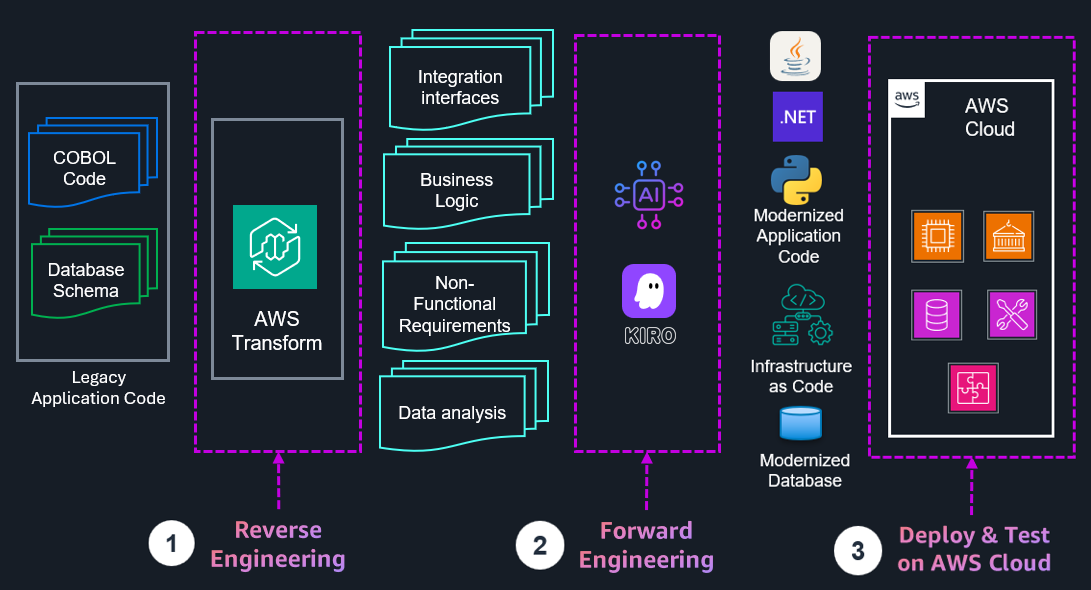
Figure 4: AWS Transform and Kiro working together. AWS Transform handles reverse engineering and analysis. Kiro takes the structured outputs through forward engineering to produce modernized code and Infrastructure as Code, deployed to AWS Cloud.
When you start a feature or modernization task in Kiro, it runs a three-phase workflow before writing any code:
- Requirements: Unpacks your prompt into structured user stories with EARS notation acceptance criteria. Assumptions are made explicit.
- Design: Analyzes your codebase and generates data flow diagrams, interfaces, database schemas, and API endpoints based on your approved requirements.
- Tasks: Sequences implementation tasks based on dependencies, links each to requirements, and includes unit tests, integration tests, and non-functional requirements. Nothing falls through the cracks.
Kiro also has hooks: event-driven automations that trigger when you save, create, or delete files. Update tests when a component changes, refresh API documentation when an endpoint is modified, scan for security issues before a commit. Once committed to Git, hooks run automatically for the entire team, enforcing standards consistently across every engineer.
For cloud modernization specifically, Kiro connects to official AWS MCP servers for real-time AWS documentation, current pricing, and infrastructure code generation. Assessment work that previously took weeks is being completed in days.
–> AWS MCP Servers
AWS has published an official ecosystem of Model Context Protocol (MCP) servers that give AI tools direct, real-time access to AWS services, documentation, and pricing. Key servers for modernization programs:
- AWS Documentation MCP: Real-time access to current AWS documentation rather than training data that may be months out of date.
- AWS Pricing MCP: Live cost modeling as you design architectures, so trade-off decisions happen at design time, not after deployment.
- CDK MCP and Terraform MCP: Infrastructure code generation with built-in security scanning via CDK Nag and Checkov. Compliance checks run as part of code generation.
- AWS Diagram MCP: Architecture diagram generation directly from code and service analysis.
AWS DevOps Agent: Operations After Migration
One thing migration programs consistently underestimate is post-migration operations. Workloads behave differently on AWS than they did on-premises. New failure modes emerge. The team that managed your data center is not always the team best equipped to operate your AWS environment.
AWS DevOps Agent, generally available since March 2026, addresses this directly. It is not a chatbot you ask questions to. When an alert fires, it begins investigating immediately, whether at 2 AM or during peak hours, without waiting for a human to start the process.
It connects to your observability tools (CloudWatch, Dynatrace, Datadog, Grafana, New Relic, Splunk), your code repositories (GitHub, GitLab, Azure DevOps), and your incident channels (Slack, ServiceNow, PagerDuty), then correlates telemetry, code changes, and deployment history simultaneously to identify root cause and recommend resolution steps.
Western Governors University reduced incident resolution time from two hours to 28 minutes on a production incident using AWS DevOps Agent, a 77% reduction. The agent surfaced the root cause in a Lambda configuration from internal documentation that the team had not found. United Airlines and T-Mobile are among the other enterprise adopters reporting meaningful MTTR improvements.
Beyond incident response, AWS DevOps Agent analyzes historical incident patterns and generates improvement recommendations across four areas: observability gaps, infrastructure optimization, deployment pipeline improvements, and application resilience. Each recommendation arrives as an agent-ready spec you can pass directly to Kiro for implementation.
For migration programs, the post-migration window is when teams are most exposed. AWS DevOps Agent gives you an experienced operations engineer watching your migrated environment from day one, not just during the period when your migration team is still engaged.
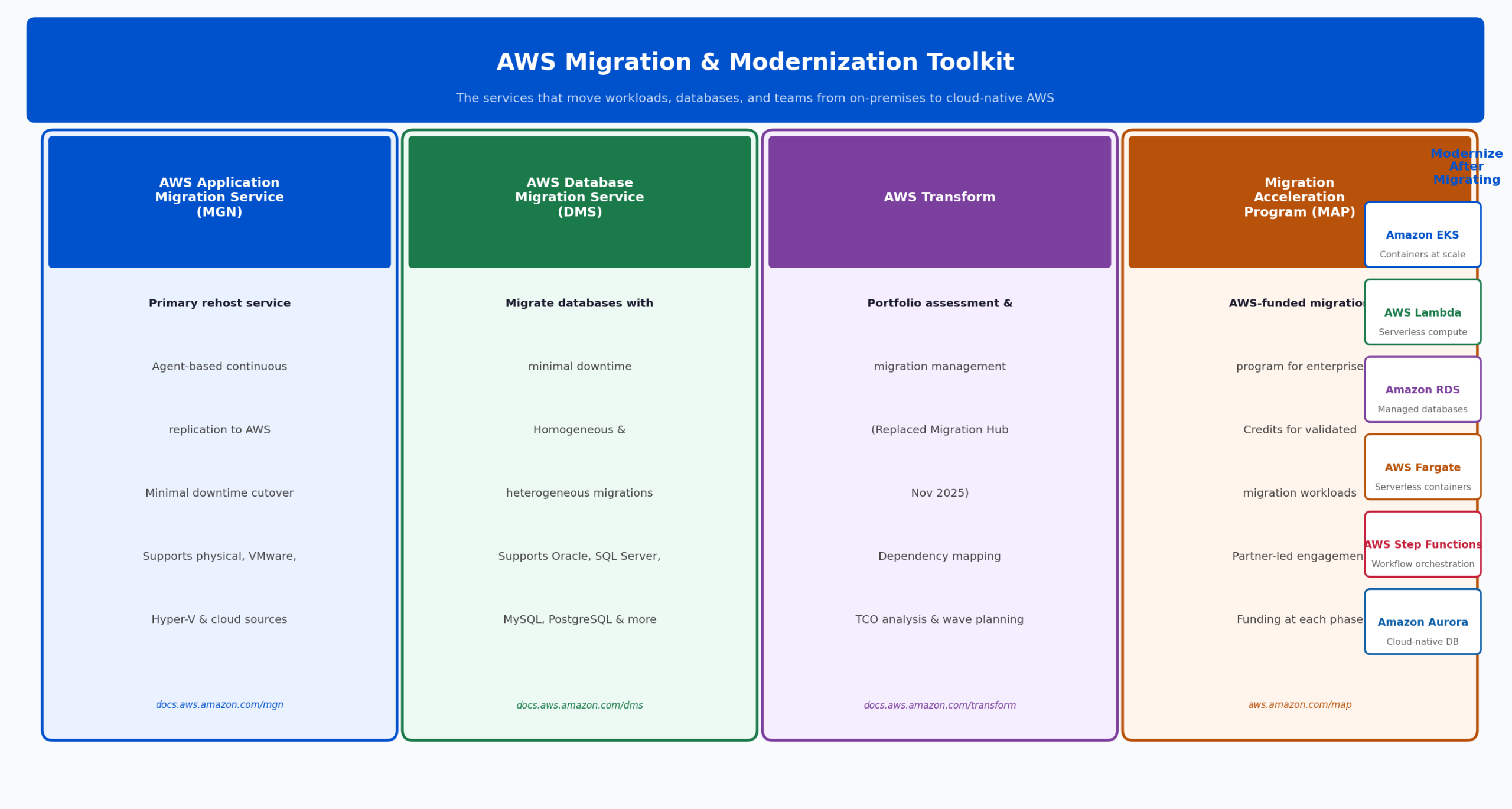
Figure 5: AWS Migration and Modernization Toolkit. MGN, DMS, AWS Transform, and MAP address the four core pillars of a successful migration program.
FinOps: Making the Economics Work: Managing AWS Cloud Migration Costs
Cloud economics only deliver if you actively manage them. The teams that see the promised savings are the ones that treat cost optimization as a continuous engineering discipline, not a quarterly finance review. The teams that do not often find their AWS bill is higher than their previous data center cost.
The most common causes:
- Incorrect sizing: On-premises, you provision for peak. On AWS, you pay for what you run. Migrating a server that was 20% utilized to a comparable EC2 instance means paying full price for 80% wasted compute. AWS Compute Optimizer analyzes actual utilization and recommends right-sized instances. Savings Plans provide discounts of up to 72% for predictable workloads.
- No cost allocation: Without a tagging strategy, you cannot see what is spending what. AWS Cost Explorer is only as useful as the tagging data behind it. Tagging must be part of migration design, not an afterthought.
- Unmodelled data transfer costs: Applications that were co-located on-premises generate data transfer charges when spread across AWS services and availability zones. This is one of the most common bill surprises post-migration and one of the easiest to model in advance.
- Non-production environments running 24/7: Dev and test environments do not need to run around the clock. Instance scheduling for non-production alone typically reduces cloud spend by 30 to 40%.
The AWS FinOps MCP Server
AWS has released a Billing and Cost Management MCP Server that connects your AI assistant directly to Cost Explorer, Compute Optimizer, Savings Plans, Budgets, and Cost Anomaly Detection. You ask in natural language, and it pulls real data from your account with specific, actionable answers. No custom scripts. No console navigation. No waiting for a monthly FinOps review to find out something went wrong three weeks ago.
Compliance and Data Sovereignty in MENA
Compliance requirements in the MENA region are more demanding than most global frameworks, and they have direct implications for how you design your AWS architecture. Treating them as a blocker rather than a design input is the most expensive mistake you can make in this region.
The right approach: compliance requirements tell you which data classification applies to which workload, which region it must reside in, which encryption standard applies, and which audit logs must be retained. That is your architecture brief. Design it from the start. Retrofitting compliance after migration is far more disruptive and expensive.
| Regulatory Framework | AWS Architecture Implications |
| UAE PDPL | Data residency in ME-CENTRAL-1, encryption at rest and in transit, data subject access controls, breach notification within 72 hours |
| SAMA CSF (Saudi Arabia) | Security baseline for financial institutions. Maps directly to AWS Security Hub controls. Requires dedicated security monitoring and incident response capabilities. |
| Bahrain PDPL | Similar to UAE PDPL. ME-SOUTH-1 residency for Bahraini personal data. Data transfer outside Bahrain requires explicit regulatory approval. |
| NESA UAE | Information assurance standards addressable through AWS compliance programs. AWS Artifact provides the documentation evidence package. |
AWS has invested heavily in the MENA region. ME-CENTRAL-1 (UAE) and ME-SOUTH-1 (Bahrain) both support the full suite of compliance and sovereignty tools. AWS Control Tower provides multi-account governance with guardrails that enforce compliance policies at the organizational level. AWS Config and Security Hub provide continuous compliance monitoring with automated remediation. AWS Artifact gives you on-demand access to compliance reports for ISO 27001, PCI-DSS, SOC 2, and regional frameworks.
Migration Acceleration Program (MAP): Reduce Migration Cost and Risk
MAP is AWS’s funded program for enterprise migrations. It provides migration credits that offset program costs, AWS solutions architects and migration specialists assigned to your engagement, and partner support through Premier Partners like SUDO.
A well-structured MAP engagement can significantly reduce the total cost and risk of a migration program. The key is engaging it at the assessment phase, before you start moving workloads. MAP credits scale based on the size and complexity of your portfolio. Teams that engage MAP after they have already started migration consistently leave value on the table.
- Assess phase: AWS-funded portfolio assessment and TCO analysis. This is typically where MAP engagement begins.
- Mobilize phase: Credits, technical resources, and partner support for landing zone build, skills development, and pilot migrations.
- Migrate and Modernize phase: Production migration credits and ongoing technical support through cutover.
SUDO: AWS Premier Partner for Cloud Migration in MENA
We have run migration and modernization programs across banking, retail, healthcare, logistics, and government sectors in the UAE, KSA, and Bahrain. Every engagement looks different. Every one of them has had at least one barrier from the list above. And everyone has taught us something that made the next one better.
As an AWS Premier Partner, our migration engagements typically cover:
- Migration readiness assessment: Using AWS Transform for portfolio discovery, dependency mapping, and TCO analysis. We size your program before you commit to a timeline.
- 7Rs strategy assignment: Workload-by-workload strategy across your full application portfolio, with a clear rationale for each decision.
- Landing zone design: AWS account structure, Control Tower setup, networking, and governance guardrails aligned to your compliance requirements.
- Wave-based migration execution: Using AWS MGN and DMS, sequenced by the dependency map, not by what is easiest to move first.
- Database migration and schema conversion: Strategy, tooling, and execution, including heterogeneous database modernization where applicable.
- MAP engagement and credit management: We engage MAP on your behalf and structure the engagement to maximize the credits and technical support available.
- Compliance architecture: UAE, KSA, and Bahrain regulatory requirements designed in from the start, not retrofitted.
- Post-migration optimization: Right-sizing, tagging, cost governance, and AWS DevOps Agent onboarding for ongoing operational excellence.
- Modernization roadmap: Containerization, serverless adoption, CI/CD pipeline build, and the agentic tooling (Kiro, AWS MCP servers) to accelerate delivery.
We do not run the same playbook for every customer and hope it fits. We start with a proper understanding of your portfolio, your team, your compliance obligations, and your business objectives, and we design a program built around your actual constraints.
Ready to Start Your Migration Program?
Talk to SUDO’s migration architects. We will tell you exactly where you are and what it will take to move.
Book a Free AWS Cloud Migration Assessment
View Our AWS Migration Services for MENA

Cloud Engineer 2 at SUDO Consultants and former AWS engineer, writing about cloud resilience, disaster recovery and modernization.